



Most gaming laptop “buying guides” in 2026 read like a bullet list of GPU names and a chart that nobody actually checks. This isn’t that. This is the guide for someone who’s about to spend $1,500-$3,500 on a portable gaming machine and wants to know which specs actually matter, which are marketing fluff, and which brands consistently get the boring stuff (cooling, build quality, warranty) right.
Gaming laptops in 2026 are genuinely good — better than ever, by a clear margin. The 2024-2025 RTX 50-series Mobile launch closed most of the perceived gap with desktop, OLED panels are finally affordable, and the thin-and-light category became viable for serious gaming. But the bad picks are still bad. Knowing what to look for matters more than ever because the gap between the right $2,000 laptop and the wrong $2,000 laptop has never been wider.
First question: do you actually want a laptop?
Worth asking before any spec discussion. A gaming laptop costs roughly 1.5x what a comparable desktop costs for the same performance, has worse cooling, is harder to upgrade, and runs hot on your actual lap. The trade-off is portability — and portability either matters a lot to you or it doesn’t.
You should buy a gaming laptop if: you actually travel with it, you have no room for a desktop, you game in multiple physical locations (home + office + dorm), or you split work and play on one machine. You should buy a desktop if: the laptop will live on the same desk for 95% of its life. There’s no third answer.
Once you’ve committed to the laptop side, the rest of this guide makes sense. If not, your money goes much further toward a desktop.
The GPU tier decision (the most important spec)
In 2026, the meaningful GPU choices for gaming laptops break into four tiers. Each is genuinely capable; each has a different price-to-performance shape.
RTX 5070 Mobile — the value tier ($1,300-$1,800)
Targets 1080p and 1440p gaming at high frame rates with DLSS 4 enabled. Will handle every current AAA title at playable settings and a bit beyond. The right pick for anyone who plays competitive multiplayer (where frame rate matters more than max settings) or who values battery life and weight.
The 5070 Mobile is roughly equivalent to a desktop RTX 4070 in raw performance, with the Mobile-specific power constraints. It is genuinely the sweet spot for most buyers.
RTX 5080 Mobile — the enthusiast tier ($2,000-$2,800)
Targets 1440p high-refresh and 4K-with-upscaling for AAA titles. This is the “I want my games to look great but I also want it to actually fit in a bag” tier. The 5080 Mobile sits in the price-performance sweet spot if your primary game library is graphically demanding single-player AAA.
RTX 5090 Mobile — the flagship tier ($2,800-$3,800)
Top of the line. Real 4K-capable for modern AAA with DLSS. Required for VR-on-laptop, content creation alongside gaming, or future-proofing for 2027-2028 games. Most people don’t need this. The people who do, know already.
Older / lower options to avoid
Anything below the RTX 5070 Mobile in 2026 (RTX 4060 Mobile leftovers, Intel Arc, AMD lower-tier mobile) is buying year-old hardware at full prices for marginal savings. Skip unless the discount is dramatic — 30%+ off MSRP minimum.
Display: where most buyers waste money or save it
The 2024-2025 OLED gaming laptop wave changed the buying calculus. A 240Hz OLED panel is now available on mid-tier laptops, and the visual difference vs traditional IPS is genuinely transformative. Get OLED if budget allows.
The display specs that actually matter, ordered by impact:
- Panel type: OLED > Mini-LED > IPS. The gap between OLED and IPS is bigger than the gap between an RTX 5070 and RTX 5080.
- Refresh rate: 240Hz is the new sweet spot. 360Hz only matters for competitive esports at the highest tier. 165Hz is acceptable on a budget.
- Resolution: 1440p at 16″ is the right balance in 2026. 4K is overkill for 16″ panels (you can’t see the pixels). 1080p is fine on 14″ thin-and-lights.
- Brightness: 400 nits minimum for comfortable indoor use. 600+ nits if you’ll game in lit rooms.
Resolution is the spec most marketing pages overhype and most buyers overweight. A 1440p OLED beats a 4K IPS for gaming, every time.
Cooling — the spec marketing pages bury
This is the unglamorous spec that decides whether your laptop is still good after 18 months. Laptops with weak cooling thermal-throttle, which means the GPU and CPU run below their rated speeds when the chassis gets hot. You paid for an RTX 5080 Mobile; you get RTX 5070-equivalent sustained performance.
What to look for:
- At least dual fans, ideally triple-fan designs
- Vapour chamber cooling in flagship models (rare under $2,500)
- Real reviews of sustained performance — not just peak benchmarks
- A vent layout that pushes hot air away from you, not into your lap or palms
Reviews from Notebookcheck, Hardware Unboxed, and Just Josh consistently flag cooling. Read the cooling section of any review before clicking buy.
The 4 gaming laptop tiers compared
| Tier | GPU | Budget | Best for | Trade-off |
|---|---|---|---|---|
| Value | RTX 5070 Mobile | $1,300-$1,800 | Competitive multiplayer, balanced single-player | 1440p with DLSS, not native 4K |
| Enthusiast | RTX 5080 Mobile | $2,000-$2,800 | AAA single-player at high refresh | Heavier chassis, worse battery |
| Flagship | RTX 5090 Mobile | $2,800-$3,800 | Top-tier AAA, VR, creator workloads | Diminishing returns over 5080 |
| Thin-and-light | RTX 5070/5080 in thin chassis | $2,200-$3,200 | Travel + gaming + work in one | Cooling compromised; runs hotter |
Brand notes — who actually delivers in 2026
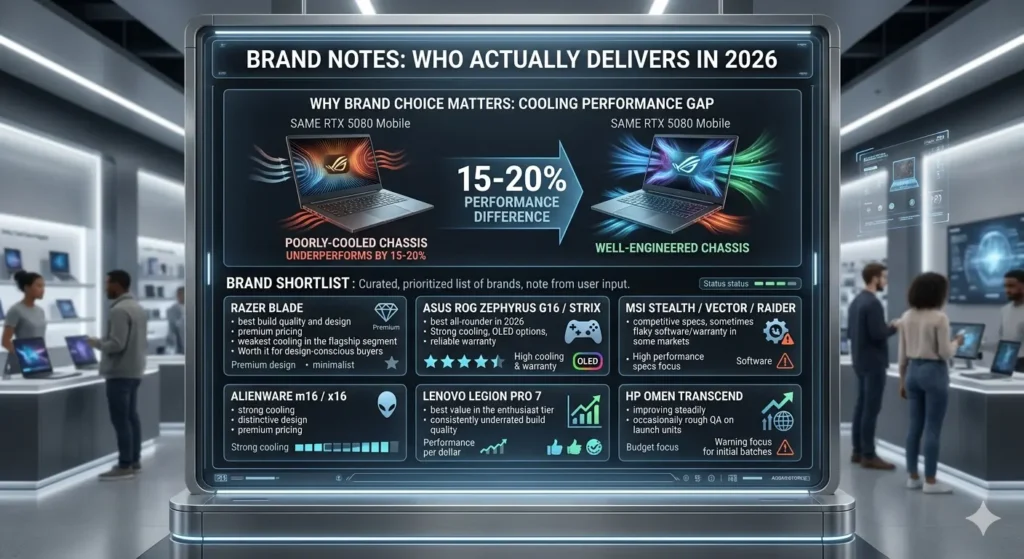
Picking the right brand matters as much as picking the right specs. The same RTX 5080 Mobile in a poorly-cooled chassis underperforms the same chip in a well-engineered one by 15-20%. The brands worth shortlisting in 2026:
- Razer Blade — best build quality and design, premium pricing, weakest cooling in the flagship segment. Worth it for design-conscious buyers.
- ASUS ROG Zephyrus G16 / Strix — best all-rounder in 2026. Strong cooling, OLED options, reliable warranty.
- MSI Stealth / Vector / Raider — competitive specs, sometimes flaky software/warranty in some markets.
- Alienware m16 / x16 — strong cooling, distinctive design, premium pricing.
- Lenovo Legion Pro 7 — best value in the enthusiast tier; consistently underrated build quality.
- HP Omen Transcend — improving steadily; warranty depends heavily on region.
- Acer Predator Helios — aggressive pricing, occasionally rough QA on launch units.

Avoid: any brand you’ve never heard of selling RTX 5080 Mobile laptops at suspiciously low prices on Amazon. The chips are real; the cooling and warranty are usually not.
Form factor: thin-and-light vs traditional
The thin-and-light gaming laptop category (ASUS Zephyrus G16, Razer Blade 16, MSI Stealth) became genuinely viable in 2024-2025. A 16″ gaming laptop under 2kg is now a real product, not a compromise.
The trade-off is sustained performance. Thin chassis = less cooling headroom = thermal throttling under sustained load. For 1-2 hour gaming sessions, the gap is negligible. For 4+ hour sessions or competitive marathon play, traditional thicker laptops still win.
Quick rule: if you’ll game more than 3 hours straight regularly, lean traditional. Otherwise, thin-and-light is the better daily device for most modern gamers.
Battery life — the spec to set realistic expectations on
Gaming laptops in 2026 still drain batteries during gaming. The honest numbers: 1-2 hours of actual gaming on battery is typical. 6-9 hours on light productivity. The marketing claims of “12-hour battery” assume video playback at low brightness with the dGPU disabled.
If battery life matters meaningfully (frequent travel, long flights, working off-outlet), prioritise laptops with NVIDIA Advanced Optimus or AMD SmartShift — both let the dGPU shut off completely when not needed. Most 2026 RTX 50-series laptops support this; verify the spec before buying.
The 2026-specific stuff that matters (and doesn’t)
The new categories the industry pushed hard in 2025-2026, with honest assessments:
- Copilot+ branding / NPU performance: marketing. Gaming workloads don’t use NPUs in any meaningful way as of mid-2026. Don’t pay extra for it.
- AI-enhanced upscaling beyond DLSS/FSR: real but already integrated into DLSS 4 and FSR 4. Not a separate purchase consideration.
- WiFi 7: meaningful upgrade if your router supports it. Future-proofing is genuine here.
- Thunderbolt 4 / USB4: required for any laptop you’ll use with external displays or eGPU setups. Skip laptops without it.
- HDMI 2.1: important if you game on an external 4K TV. Don’t assume it’s included.
What to actually do — the 30-minute decision process
If you have 30 minutes and want a buying decision:
- Decide GPU tier based on your primary games + budget (5070 Mobile for most, 5080 if AAA-focused).
- Decide form factor — thin-and-light if you travel/move often, traditional if mostly stationary.
- Filter to 3-4 specific models in your tier from ASUS ROG, Lenovo Legion, Razer Blade, MSI.
- Read the Notebookcheck cooling and sustained-performance review for each.
- Buy from the brand with the best warranty in your region — quality control varies more than reviews suggest.
- Skip the extended warranty upsell — it’s almost never worth it.
For more context on hardware trends shaping gaming in 2026, see our list of must-have gaming gadgets and the next-decade gaming outlook.
What to watch over the next 12 months
- Mid-cycle refreshes: ASUS and Razer typically refresh in spring 2027 with improved chassis or panel options.
- OLED below the $1,500 tier: currently rare; if a credible budget OLED gaming laptop launches in late 2026, it shifts the value-tier calculus.
- AMD Strix Halo successor: AMD’s all-AMD gaming laptop story may finally hit parity with Intel+NVIDIA. Worth watching for buyers who care about Linux or value.
- Apple’s gaming push: M5 Pro MacBook Pros are running serious games at 2025-2026 quality. Not yet a true gaming laptop alternative, but the gap is closing meaningfully.
The honest summary: gaming laptops in 2026 are great if you actually need portability and bad value if you don’t. Once you’ve committed, the right $1,800 Lenovo Legion or $2,400 ASUS Zephyrus G16 beats the wrong $3,000 Razer Blade meaningfully. The brand, cooling, and panel decisions matter more than the GPU once you’ve picked the right tier.
FAQ
Are gaming laptops worth it in 2026?
Yes, if you genuinely need portability. A gaming laptop costs roughly 1.5x what a comparable desktop costs for similar performance, runs hotter, and is harder to upgrade. The trade-off is real — but if you actually move your machine between locations or have no room for a desktop, the modern crop (RTX 50-series Mobile, OLED panels, viable thin-and-light designs) genuinely delivers.
What GPU should I get in a 2026 gaming laptop?
For most buyers, the RTX 5070 Mobile in the $1,300-$1,800 range is the sweet spot — capable 1440p gaming with DLSS, decent battery, manageable weight. Step up to the 5080 Mobile if AAA single-player at high refresh is your priority and you can spend $2,000-$2,800. The 5090 Mobile is overkill for most people.
Is OLED worth it on a gaming laptop?
Yes, more than almost any other display upgrade. The visual difference between OLED and IPS in motion is bigger than the gap between a 5070 and a 5080. A 240Hz OLED panel is now available on mid-tier laptops — get it if your budget allows. The risk of burn-in on modern OLED panels with proper pixel-shift technology is genuinely low for typical gaming use.
How long do gaming laptops actually last on battery while gaming?
1-2 hours of real gaming is typical in 2026, even on premium models. Marketing claims of “12-hour battery” assume video playback at low brightness with the discrete GPU disabled. If battery life matters during travel, prioritise laptops with Advanced Optimus or SmartShift — both let the dGPU shut off completely when not needed.
Are thin-and-light gaming laptops really viable for serious gaming?
For 1-3 hour sessions, yes. For sustained 4+ hour gaming or competitive marathon play, thicker traditional chassis still win because cooling headroom is greater. The Razer Blade 16, ASUS Zephyrus G16, and MSI Stealth lines are genuine thin-and-light gaming options in 2026 — just expect 10-15% lower sustained performance than thicker peers with the same chip.
Which gaming laptop brand has the best reliability?
Lenovo Legion and ASUS ROG consistently score highest on long-term reliability in independent surveys (Rtings, JD Power) in 2025-2026. Razer has the best build quality but weakest cooling in the flagship segment. Alienware has strong cooling but is overpriced. MSI is competitive on specs but software/warranty quality varies by region. Avoid lesser-known brands selling premium chips at suspicious prices on Amazon.
Is the Copilot+ branding meaningful for gaming?
No. Gaming workloads don’t use the NPU in any meaningful way as of mid-2026, and Microsoft’s Copilot+ features are mostly productivity-focused. Don’t pay extra for Copilot+ branding on a gaming laptop. Focus on the GPU, panel, and cooling instead — those decide actual gaming performance.
Should I get a gaming laptop or a gaming desktop?
Desktop, unless you specifically need portability. The same money buys roughly 50% more performance on a desktop, runs cooler, lasts longer, and is much easier to upgrade. Gaming laptops are the right choice if you travel with your machine, have no room for a desktop, or split work and play on one device — but if your laptop will live on the same desk for 95% of its life, you’re paying a portability tax you’ll never use.
Want sharper coverage of gaming hardware, console economics, and what’s actually worth your money? Subscribe to the TechDaily360 weekly briefing for the next dispatch.